
Upgrading to the iPhone 18 Pro: How Much Faster Does Piqt Curate?
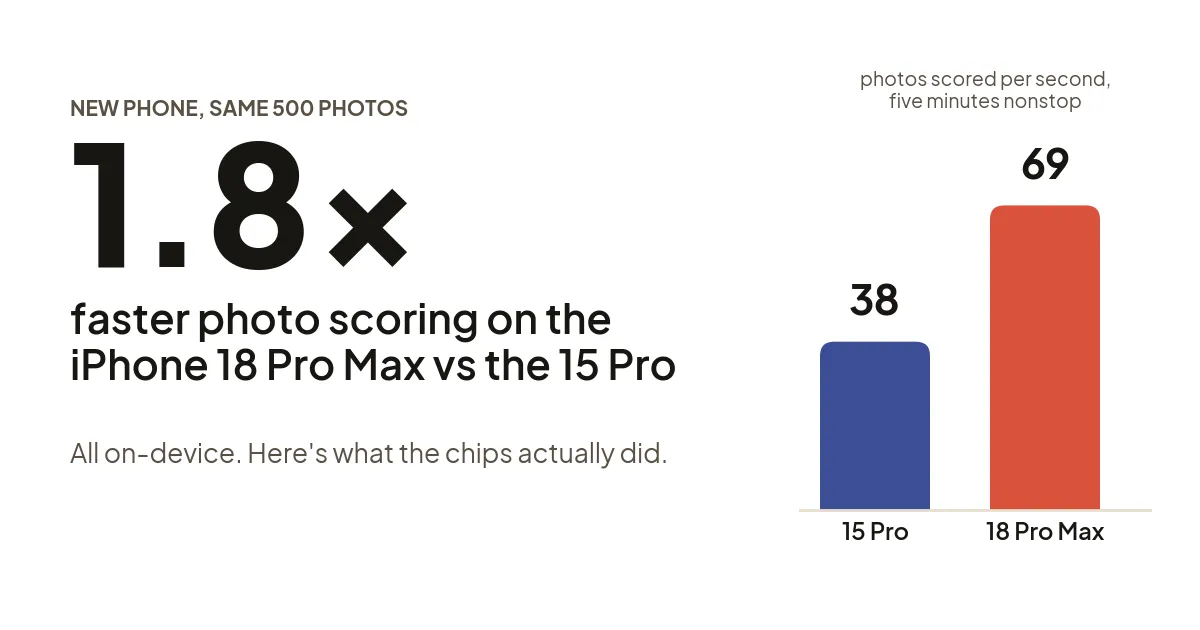
I benchmarked Piqt on my iPhone 15 Pro and my new iPhone 18 Pro Max before trading the old one in. The new phone scores photos about 1.8 times faster, but heat management continues to impact performance.
When Apple introduced the A20 processor in the iPhone 18 Pro, I was excited to see how the dual neural engines would boost the performance of Piqt. Piqt scans completely on device, so this year’s new chips seemed like they could provide a nice bump. I just got my new iPhone 18 Pro Max this week, so I wanted to benchmark my new phone against my old, before trading it in. How much faster is the iPhone 18 Pro / Pro Max?
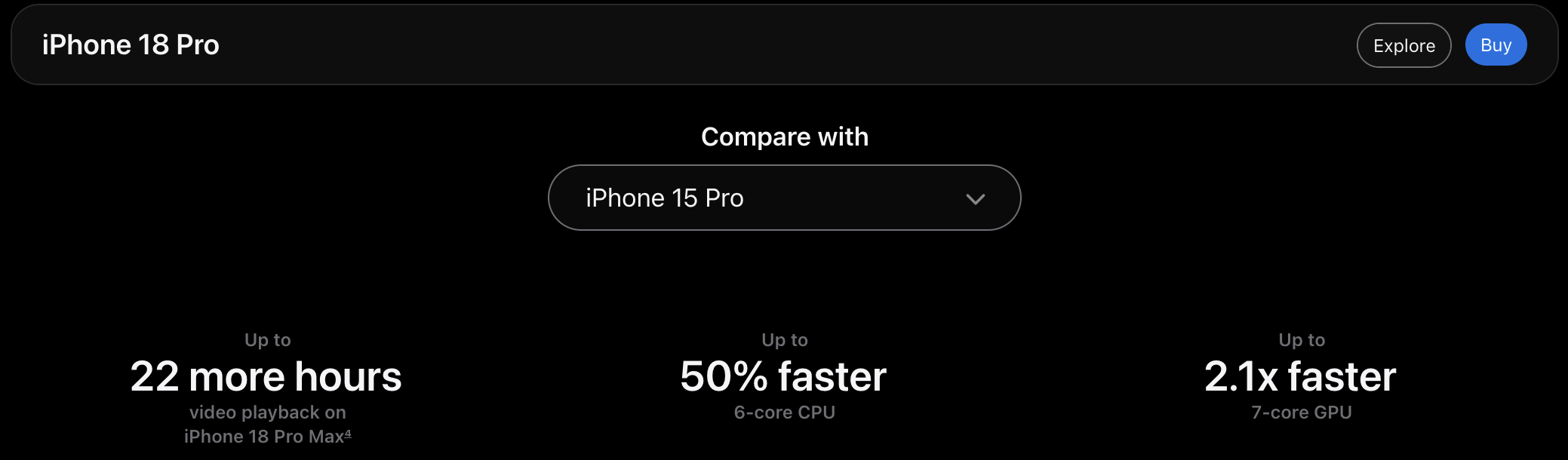
Apple's Comparison of 18 Pro and 15 Pro
In Piqt, every photo gets looked at by a small team of AI models that judge sharpness, style, faces, near-duplicates and what’s in the picture, and none of it touches a server. That means the iPhone’s chip is Piqt’s engine. A faster chip should mean a faster curation, so I built a proper test to find out how much. Apple’s marketing claims up to 50% faster CPU and 2.1x faster GPU than my iPhone 15 Pro, but doesn’t say much about neural engine performance. Since Piqt is neural engine heavy, will we see similar uplift?
The short answer: the 18 Pro Max scores photos about 1.8 times faster than the 15 Pro. That’s a pretty significant jump, but even with the iPhone 18 Pro’s new vapor chamber, heat is still a limiting factor.
What Piqt does with every photo
When Piqt scans your library, each photo goes through up to seven models. Two NIMA models rate technical quality and style. Apple’s Vision framework adds its own aesthetic score, a face quality check and a fingerprint Piqt uses to find look-alike shots. A CLIP model turns the photo into something searchable. Screenshots and documents also get their text read.
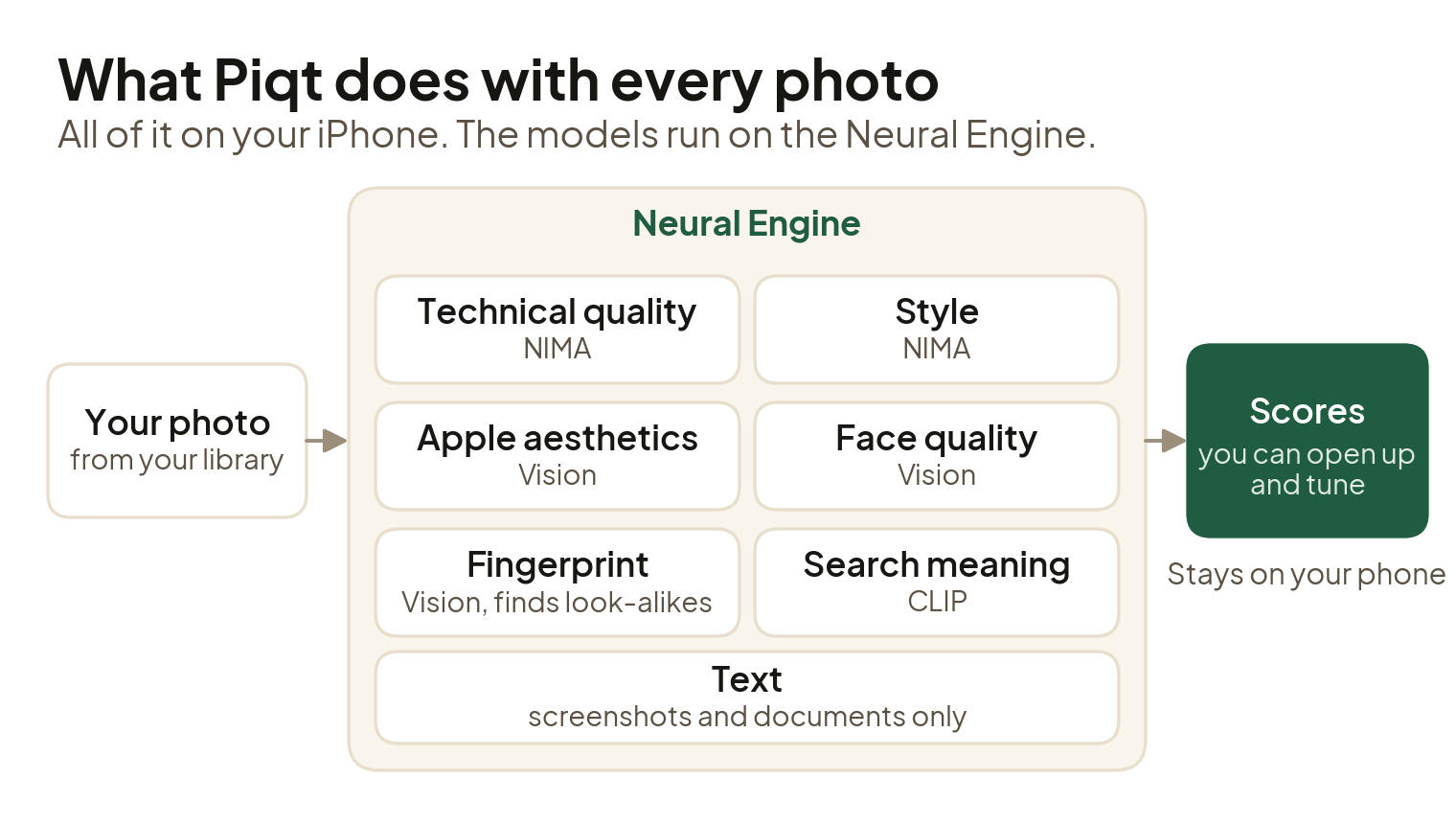
Every model runs on the iPhone's neural engine
All of that runs on the neural engine, the part of Apple’s chips built exactly for machine learning models. Why run everything locally on devices whose performance regularly changes? Because it’s more secure (your data never leaves your device) and a little better for the environment (it doesn’t get shipped off to some datacenter).
Apples to Apples Tests
To make the test fair, I built a benchmark into a developer build of Piqt:
- The same 500 photos on both phones. To make sure each phone was doing the exact same work, I selected the same 500 pictures for each device. I preloaded all pictures on each device to make sure iCloud downloads didn’t affect the numbers. The benchmark checks that every photo is fully on the phone before it starts.
- Fixed workloads. It scores the album with 1, 2, 4, 6 and 8 photos in flight at once, three times each, then runs a repeated stress test for five minutes.
- Same conditions. Same build, airplane mode on, plugged in, cooled down before each run, and every run done twice.
I just ran the two phones on my desk with the cases off. I don’t have a super controlled environment, but this should give us a good idea of whether the new phones really improve scanning speed.
The results
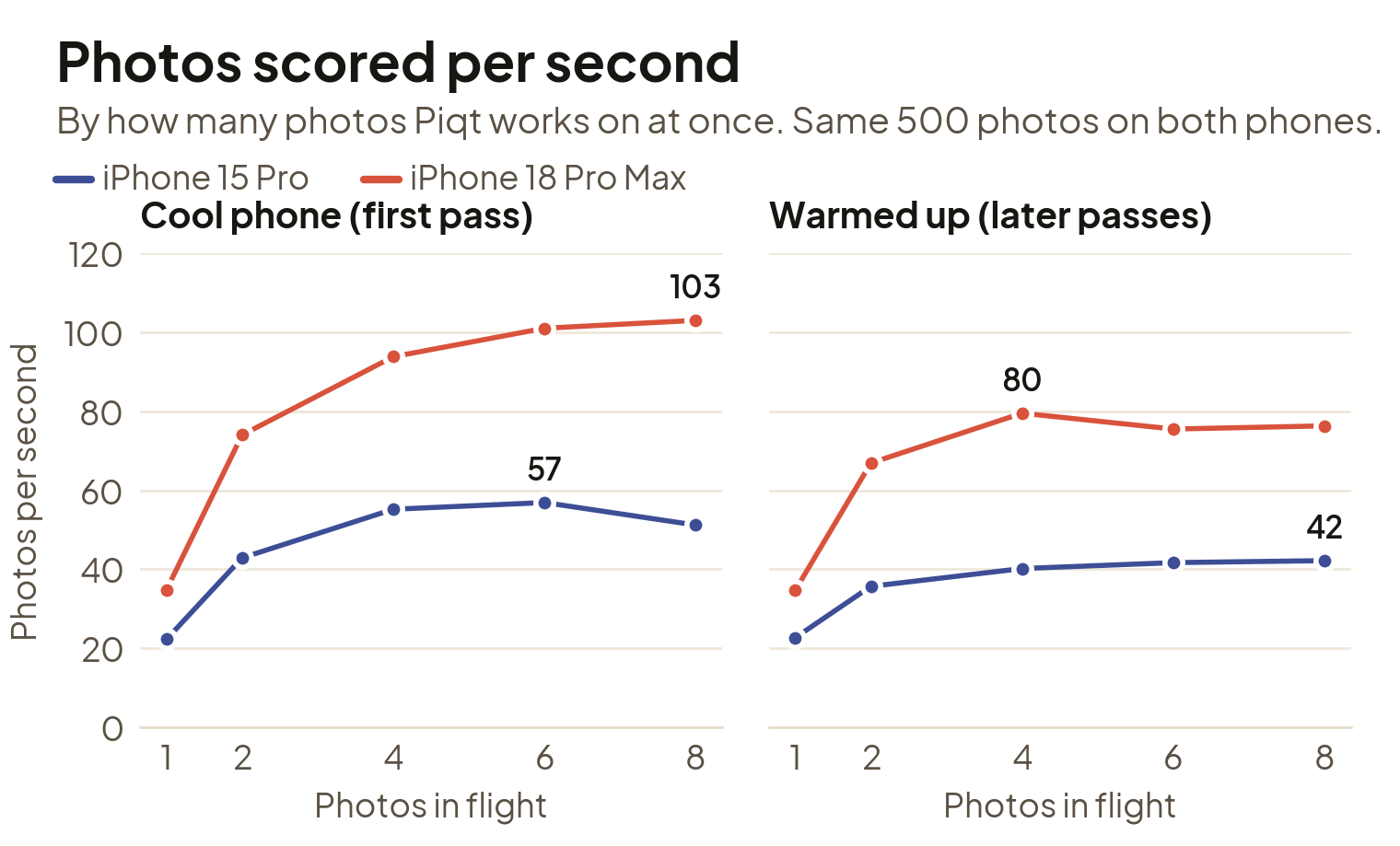
Photos scored per second, cool and warmed up
Fresh off the charger and cool, the 15 Pro tops out at about 57 photos per second, while the 18 Pro Max keeps climbing all the way to 103. Once both phones have been working for a minute or two and heat up, they settle lower: about 42 for the 15 Pro and about 75 to 80 for the 18 Pro Max. I found it pretty interesting that both phones’ performance degrades about the same, ~25%, as they heat up.
In both cases, the 18 Pro is just under 2x as fast. This is much better than Apple’s CPU claims, but a little shy of their GPU claims. We’ll dig into why later.
Heat sets the pace
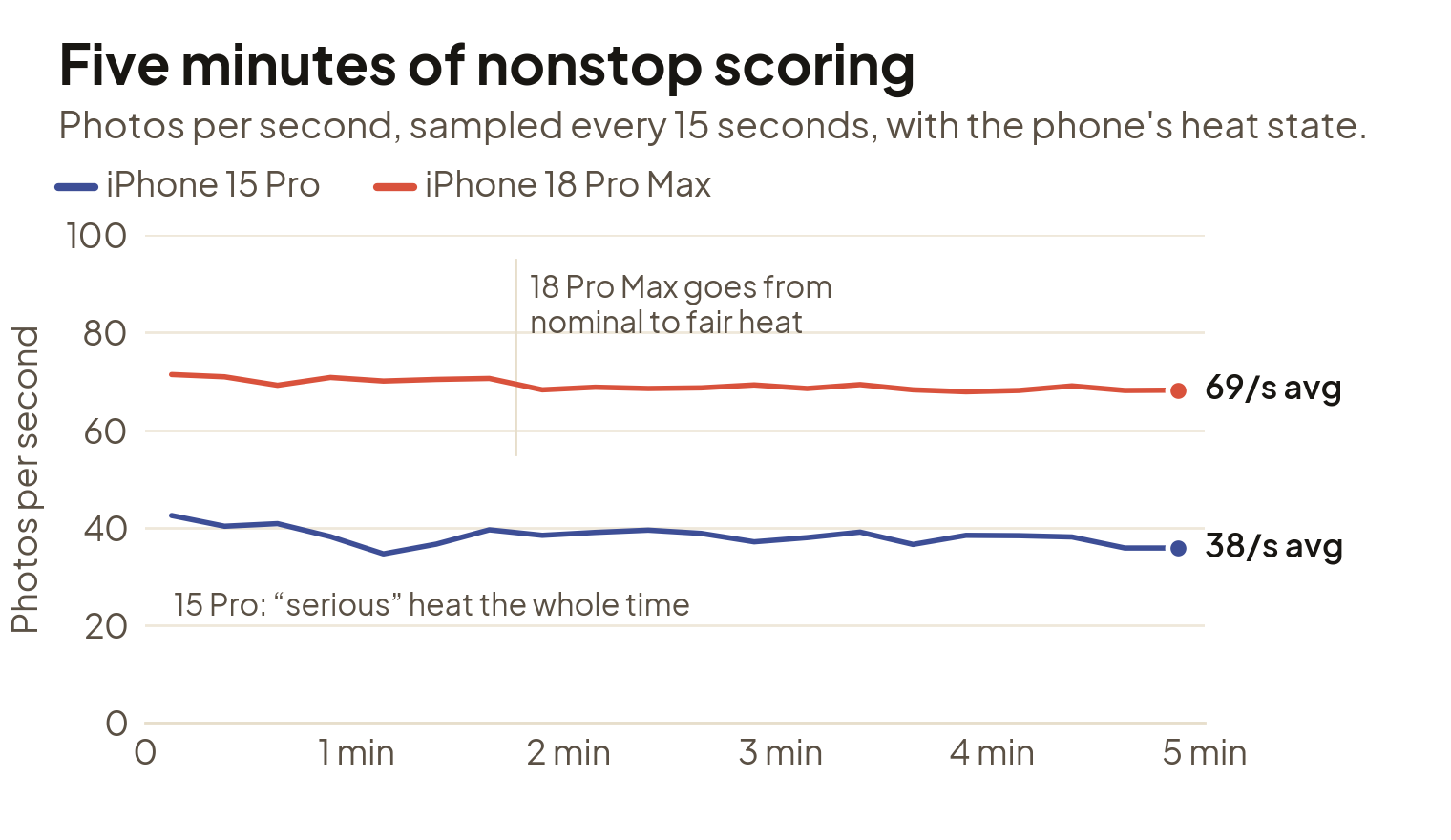
Five minutes of nonstop scoring
The five-minute run is the number I care about most, because scanning a real library takes minutes. The 18 Pro Max averaged 69 photos per second and the 15 Pro averaged 38 across the whole run.
On my development setup, the phones both report the thermal state while testing. The 15 Pro quickly hit iOS’s “serious” heat level within the first couple of minutes and stayed there. The 18 Pro Max never got past “fair” in my testing, but it still slowed down by about the same amount as the 15 Pro after its first minute of full-speed work. Newer phones are better at handling heat, but every phone slows its chips down to stay comfortable to hold.
I also want to mention that these phones can take a while to come back down to a “cool” state after a run. I had originally given phones about 10 minutes of idle time to cool down. My first two runs on the 18 Pro Max disagreed by 12%. The second run had started before the phone had fully cooled from the first. After a much longer break, a third run matched the first within 1%.
The real source of the improvement
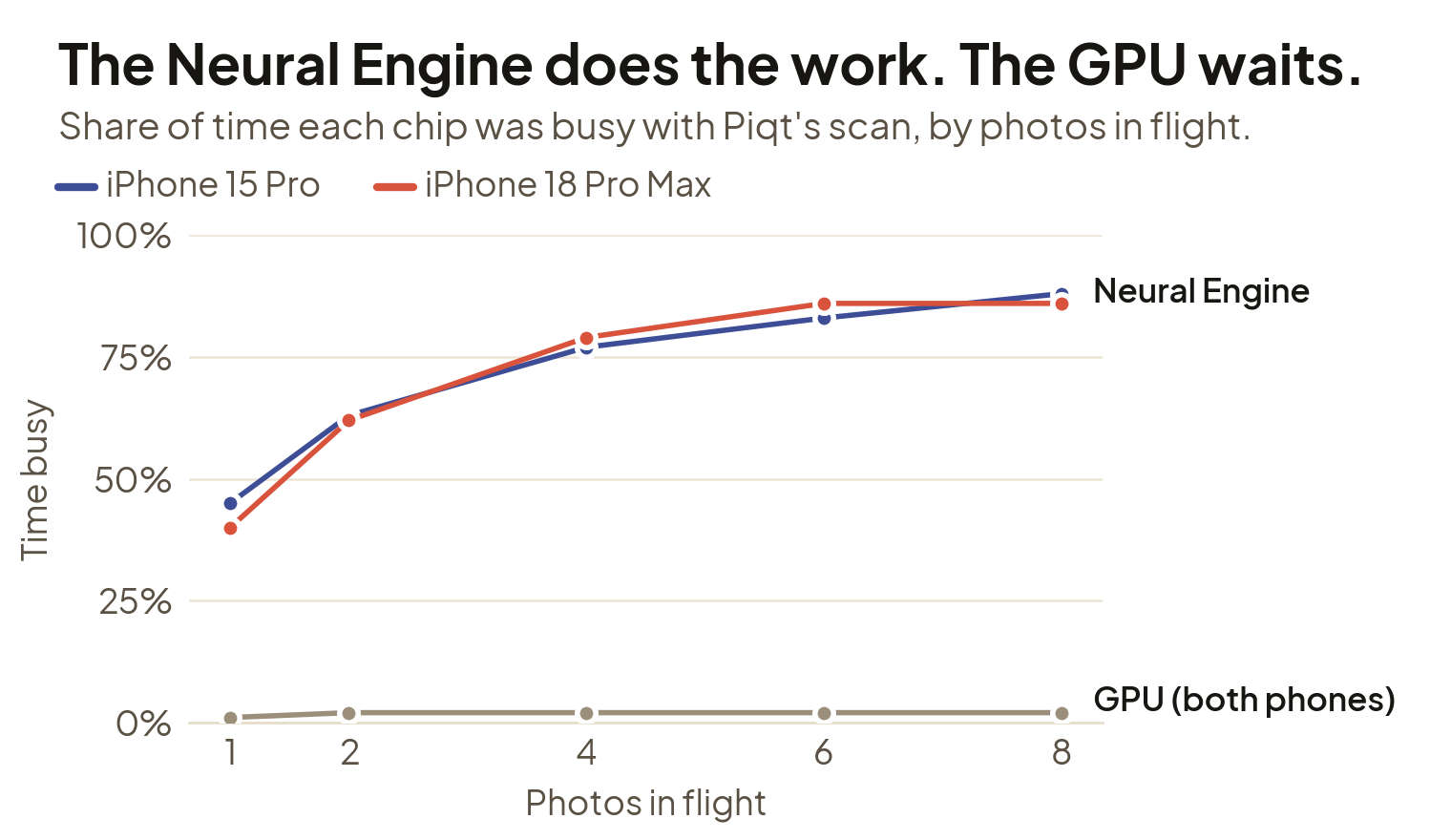
How busy each chip was during the scan
Profiling the chip with Apple’s Instruments confirms exactly what’s happening under the hood. The dual neural engines that Apple includes on the A20 (and also M6) chips are doing the real heavy lifting here. With four or more photos in flight, the neural engine is busy close to 90% of the time on both phones, while the GPU sits almost completely idle. The neural engine is the bottleneck, so its performance is the whole story.
| Neural engine work per photo | iPhone 15 Pro | iPhone 18 Pro Max | Difference |
|---|---|---|---|
| CLIP (search) | 4.3 ms | 4.1 ms | 3% less |
| Apple’s Vision models | 4.8 ms | 4.8 ms | about the same |
| NIMA (quality and style) | 0.55 ms | 0.41 ms | 25% less |
| Total | 9.6 ms | 9.4 ms | 3% less |
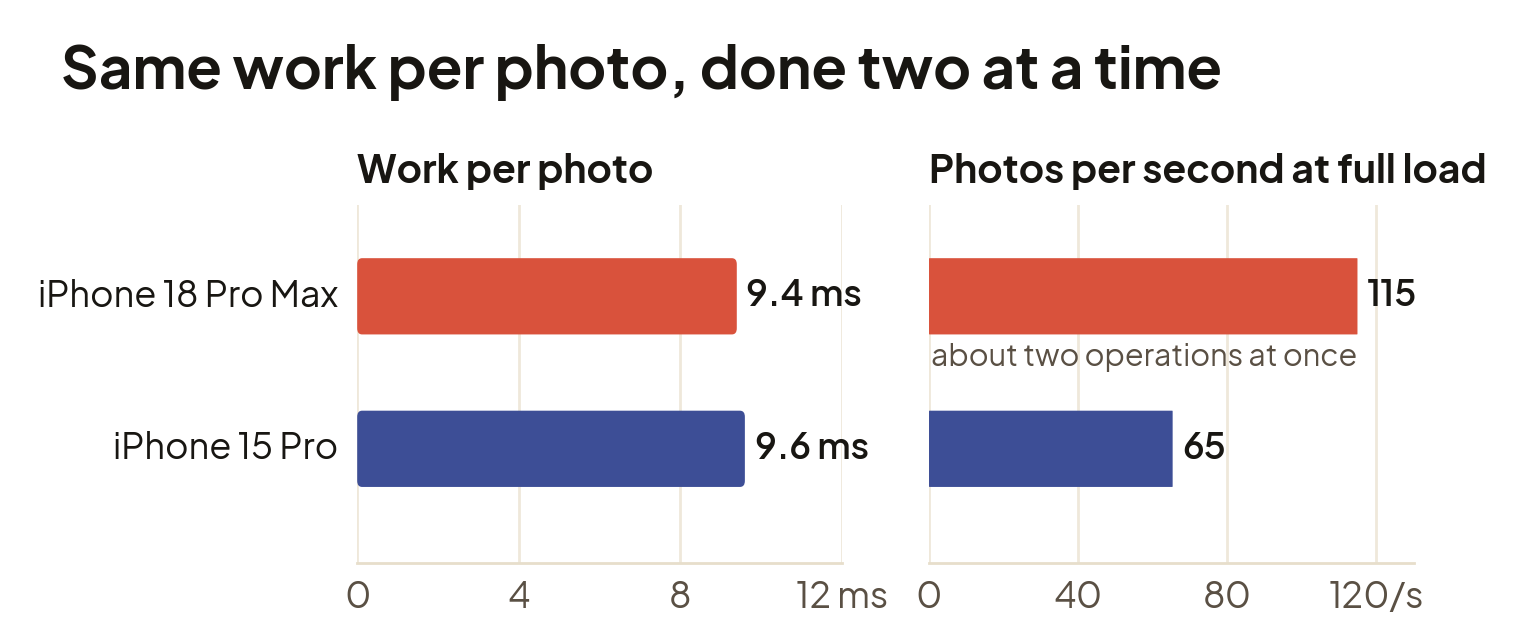
Neural engine performance in Piqt
What we can see is that the neural engine on the 18 Pro Max isn’t necessarily faster (except for the NIMA models), but is able to split the work and do twice as much at the same time. Though the profiling doesn’t tell me which engine a task is running on, the results back up Apple’s claim of 2x the neural engines on the A20. The trace also caught the impact of heat on performance: when the 15 Pro warmed up mid-test, every model took longer to run and its time per photo jumped 45%.
What this means for you
- A newer iPhone curates faster, about 1.8× going from a 15 Pro to an 18 Pro Max. For a 10,000-photo library, that’s roughly 4½ minutes of scoring on the 15 Pro and 2½ on the 18 Pro Max. A first scan takes longer than that, because many photos have to come down from iCloud first.
- Piqt already plays nice with heat. When your phone gets warm, Piqt eases off how many photos it works on at once, so the phone stays comfortable. The test showed that’s the right trade: past four photos at a time, a warm phone gains almost nothing from pushing harder.
- Older phones still get there. Everything here runs on any iPhone that runs Piqt. It just takes a little longer.
Overall, we’re a little off Moore’s law pace, with a rough doubling of performance taking three years (rather than two) between my two phones, but I’m still impressed with the results. I put a lot of work into making that initial scan on Piqt fast and the good news is that it’s just going to keep getting faster. You don’t need a brand new phone to enjoy it either. Getting through about 10,000 photos in the first few minutes allows anyone to start curating almost immediately.
What I’m trying next
That idle GPU is tempting. Seeing a key piece of the hardware mostly idle during the most performance critical part of the app seems like a huge opportunity. I’m going to test moving the search model to the GPU so both chips can share the work. However, as my Finance professor used to say “There’s no such thing as a free lunch”. Heat could be the catch, since the GPU is a bit less efficient than the neural engine, heat may ultimately be the limit.
Another thing that I didn’t dig into in this analysis is optimizing the amount of work the models can handle per call. Right now, every model call handles one photo. I’m going to try batching several photos into one call, which could squeeze more out of the neural engine without adding heat.
A few notes for the curious
- The numbers come from a developer build, which runs Piqt’s own code a little slower than the App Store version. The models run the same either way, so the comparison between phones holds.
- The photos were already on each phone, so these are scoring speeds. Downloading from iCloud is a separate wait.
- The 15 Pro was on iOS 27.0 and the 18 Pro Max on iOS 27.0.1.
All of this happens on your phone. Your photos never leave it, which is exactly why the chip in your pocket matters. My 15 Pro has served me well, but it’s now on its way back to Apple since I’ve upgraded. If you’re on the fence, the good news is that you really can’t lose. Your old phone is still plenty fast for Piqt, but if you do decide to upgrade, you can expect a nice bump.